Skip to content
GoldCRM
Traditional Indian gold necklace and earrings on a dark background

Gold shop ERP · Jewellery CRM

Every gram, every rupee, every customer — in one system.

GoldCRM brings billing, stock, gold rates, old gold, karigar work, schemes, repairs, customers and accounts together for single showrooms and multi-branch jewellers. Prices come from your approved rates, stock moves only through a ledger, and every change is audited.

  • GST invoices with CGST/SGST or IGST
  • Tag, barcode and HUID tracked stock
  • Receipts and reminders on WhatsApp
  • Web app plus Android and iOS staff app
Built forRetail jewellersWholesalersManufacturersMulti-branch chainsGold loan lenders
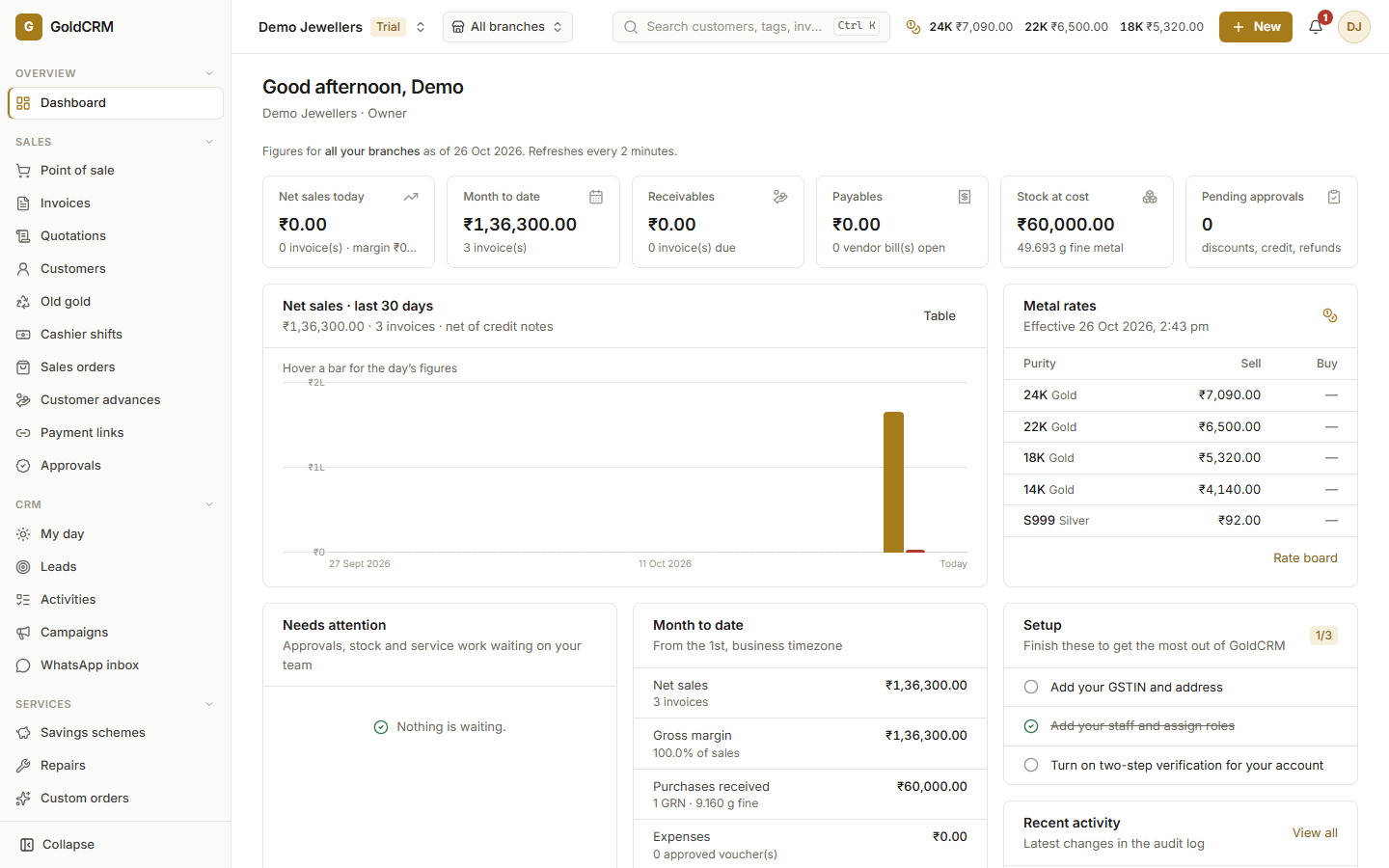
GoldCRM dashboard: sales today and this month, receivables, stock at cost, a 30-day sales chart and the approved metal rates
The GoldCRM dashboard — a demo business with sample figures

13

connected modules

From the counter to the accounts

0.001 g

weight precision

Gross, stone, net and fine weight

4

approved rate types

Sale, purchase, exchange, wholesale

100%

of stock on the ledger

Stock moves only through entries

Weights to the milligram

Gross, stone, net and fine weight kept as exact decimals — never rounded by floating point.

Approved rates only

Sale, purchase, exchange and wholesale rates by purity and branch, with maker–checker approval.

Nothing silently edited

Stock ledger, invoices, journals and the audit log are append-only. Corrections are reversals you can see.

Built for many branches

Branch-level access, transfers with dispatch and receipt, and one view across the business.

See the product

The real screens, not mock-ups

What your team works in every day — shown here with a demo business and sample figures.

01

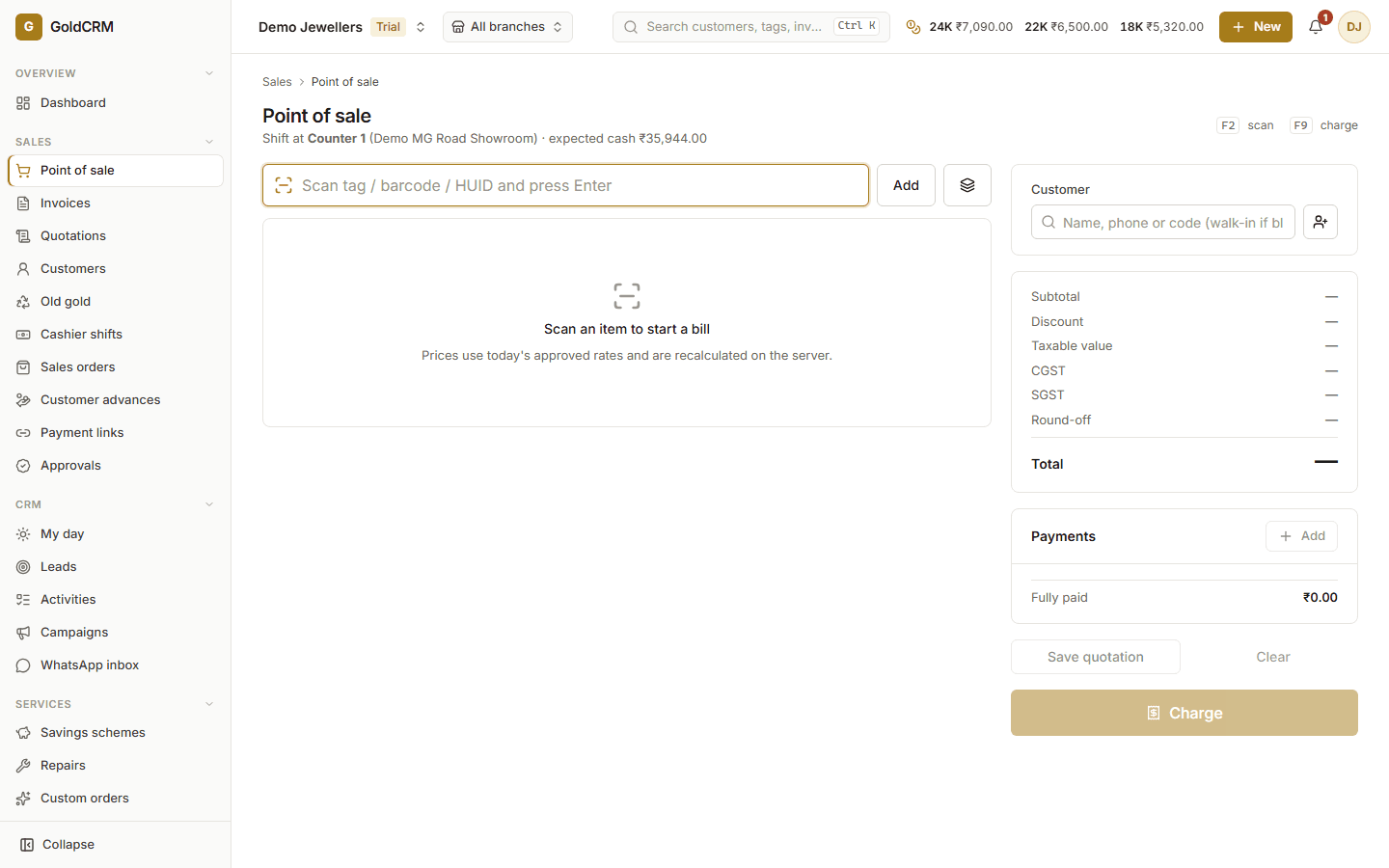
Billing at the counter

Scan a tag or HUID; the server prices it at the approved rate and splits the GST.

GoldCRM point of sale: scan a tag, choose the customer, see the GST split and take split payments

02

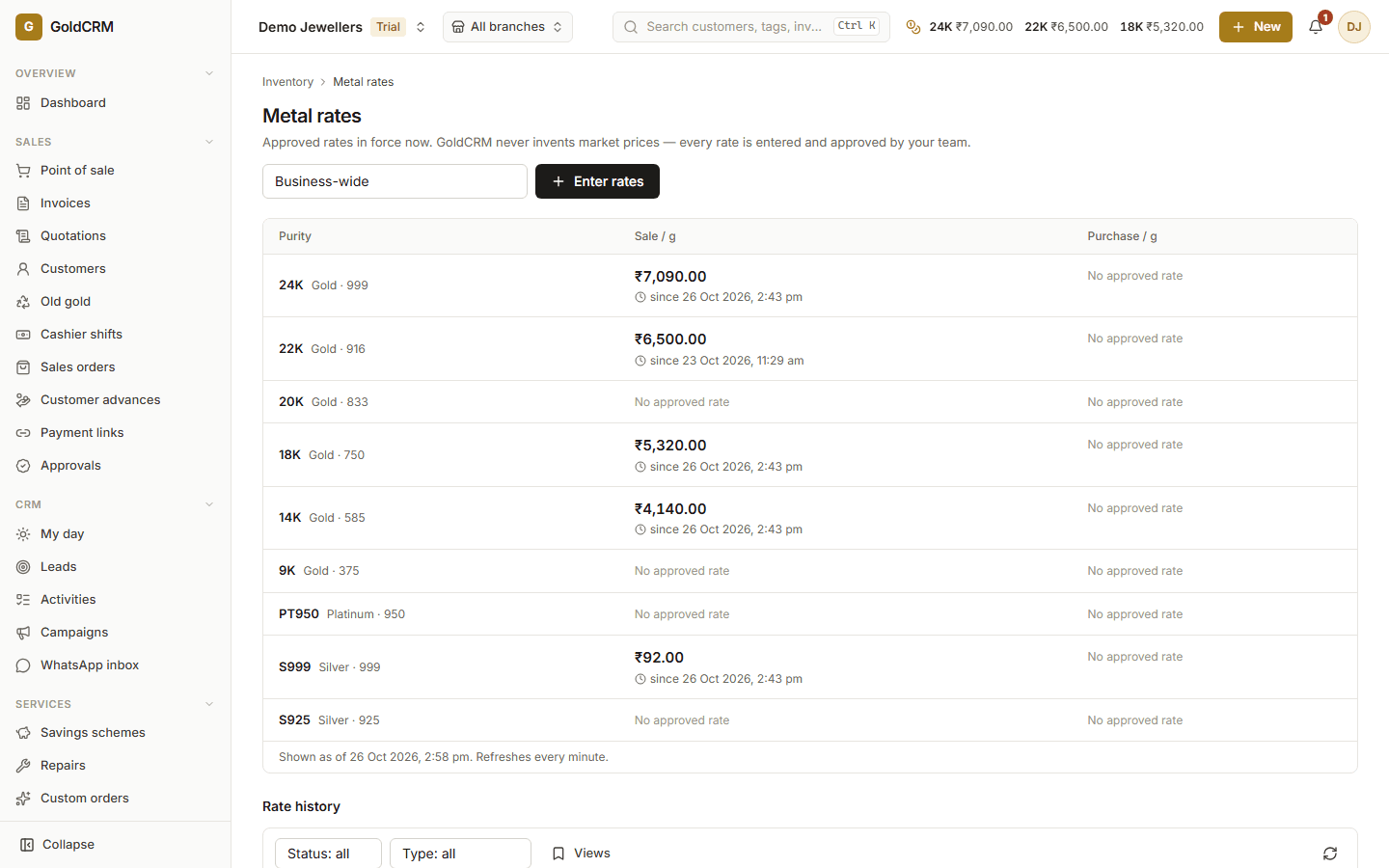
Approved rates only

Every rate is entered and approved by your team, by purity and branch, with history.

GoldCRM rate board: approved sale rates per purity with their history

03

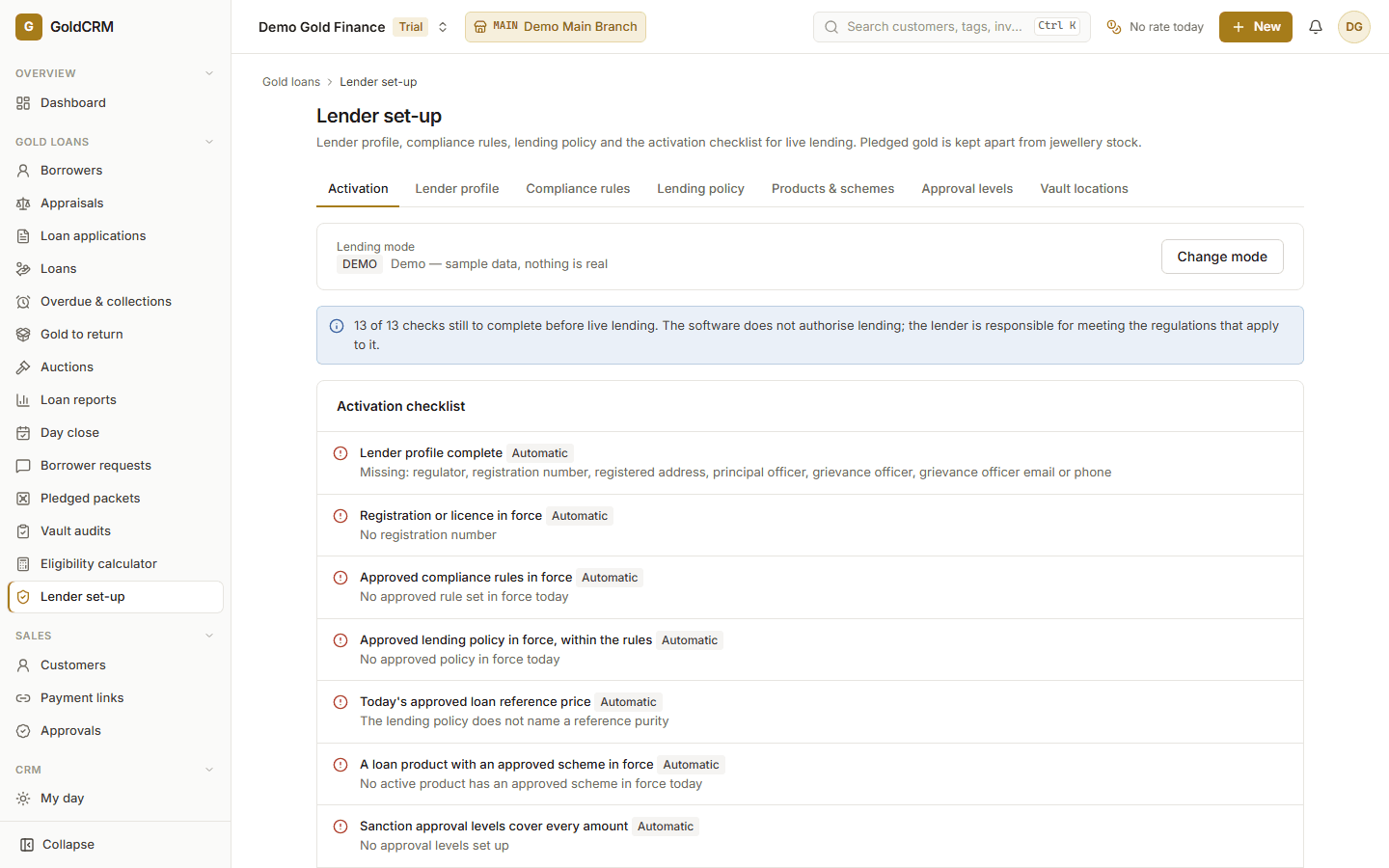
Gold loans, set up with checks

Policies, compliance rules and an activation checklist before any live lending.

GoldCRM lender set-up: lending mode and the activation checklist before live lending

Why jewellers switch

From notebooks and guesswork to one source of truth

The everyday problems of a jewellery business, and how GoldCRM handles each one.

Rates written on a board and typed into each bill

One approved rate board that every bill, quote and valuation reads from

Metal with karigars tracked in a notebook

Issues, receipts and fine-metal reconciliation with a wastage allowance

A bill posted twice when the network stutters

Idempotent posting — a retried bill or payment is never posted twice

Scheme instalments in a spreadsheet

Dated schedules, automatic reminders and redemption at billing

Old gold valued differently by each person

Tested purity, deductions and the approved exchange rate, approved by a manager

Stock counts that never match the books

A stock ledger, scanned stocktakes and adjustments that need approval

Features

Everything a jewellery business runs on

Each module works on the same records, so a sale updates stock, the customer’s history, loyalty, the cash drawer and the accounts at once.

Billing & point of sale

Scan a tag, price it at today’s approved rate and post a GST invoice in seconds.

  • Metal value, wastage, making charge (per gram, %, fixed) and stones priced by the server
  • CGST/SGST or IGST by place of supply, configurable round-off
  • Split payments: cash, card, UPI, bank, cheque, old gold, loyalty points, schemes, order advances
  • Razorpay payment links for remote payment, matched to the invoice automatically
Learn more

Stock & inventory

Every piece tagged, every gram accounted for, at every location.

  • Tagged pieces with HUID, serial number, certificate and stone details
  • Batch stock for coins, bars and loose metal by quantity and weight
  • Thermal tag printing for Zebra (ZPL) and TSC (TSPL) printers — prices are never printed on tags
  • Scanner lookup by tag, barcode, HUID or serial
Learn more

Gold & silver rates

One rate board that every price, quote and valuation reads from.

  • Rates per purity (24K, 22K, 18K, silver, platinum and your own)
  • Separate sale, purchase, exchange, valuation and wholesale rates
  • Business-wide or branch-specific rates with effective times
  • Entered by one person, approved by another; decided rates cannot be changed
Learn more

Old gold & exchange

Assess, approve and settle old gold with a clear trail.

  • Tested fineness and method, gross and stone weight, melting loss and deductions
  • Valued at the approved exchange or purchase rate
  • Maker–checker approval and recorded customer acceptance
  • Use the offer against a new invoice, or pay out after KYC
Learn more

Purchasing & vendors

From purchase order to supplier payment, including consignment.

  • Purchase orders, goods receipts and supplier bills with GST
  • Weight and purity tolerances; variances held for approval
  • Landed cost from freight and other charges
  • Vendor ledger, advances, payments and purchase returns
Learn more

Karigar job work & custom orders

Know exactly how much metal is with each karigar.

  • Issue metal or pieces to karigars and manufacturers
  • Receive finished pieces into stock and unused metal back
  • Fine-metal reconciliation with a wastage allowance
  • Custom orders with design approval, stages and due dates
Learn more

Customer CRM & loyalty

Remember every customer, every occasion, every follow-up.

  • Customer 360°: purchases, outstanding, schemes, repairs and orders
  • Leads with owners, sources, follow-ups and conversion
  • Calls, tasks, appointments and a daily “My day” agenda
  • Birthday and anniversary reminders
Learn more

Gold savings schemes

Monthly instalment schemes your staff can run without spreadsheets.

  • Fixed-amount or gold-weight schemes with bonus instalments or weight
  • Dated instalment schedules, grace days and missed-instalment tracking
  • Instalment reminders by WhatsApp, SMS or email
  • Redemption against a bill at maturity
Learn more

Repairs & service

Take in, track and hand back repairs with photos and a proper bill.

  • Intake with weight, condition report and photographs
  • Estimate, customer approval, job card and progress notes
  • Metal issued and returned from stock
  • Service GST bill in its own series, warranty dates and delivery weight check
Learn more

Accounts, GST & reports

The numbers your accountant needs, from the same records your counter uses.

  • Double-entry journals generated from posted documents; every entry balances
  • Day book, ledger, trial balance, profit and loss, balance sheet, cash flow
  • GST rates by HSN/SAC with GSTR-1 and GSTR-3B style working summaries
  • Expenses with GST input and approval
Learn more

WhatsApp, notifications & integrations

Receipts, reminders and payment links reach customers automatically.

  • Invoice PDFs, scheme instalments and repair-ready messages by WhatsApp, SMS or email
  • Daily reminders: instalments due, overdue balances, follow-ups, repairs due, maturities
  • Editable message templates per channel
  • Razorpay payment links with automatic matching
Learn more

Staff mobile app

Scan, sell, follow up and take repairs from the showroom floor.

  • Camera scanning of tags, barcodes and QR codes; lookup by tag, HUID or serial
  • Item details with weights, movements and the server’s price at today’s rate
  • Cart with tagged and batch lines, discounts, quotations and conversion
  • Split payments including old gold, loyalty, schemes and order advances
Learn more

Gold loans

Lend against gold with appraisal, sanction, sealed custody, daily interest, collections and a borrower portal.

  • Borrower onboarding with KYC documents verified by a second person
  • Appraisal with items, purity tests and photos; verified by someone other than the appraiser
  • Valuation at your approved reference price within your lending policy and compliance rules
  • Products and versioned schemes; sanction by approval level with no self-approval
Learn more

How it works

One sale, start to finish

What happens when a single piece is sold — without anyone re-typing anything.

  1. Step 1

    Scan the tag

    The piece, its weights, purity and HUID come up instantly — at the counter or on the phone.

  2. Step 2

    Priced at today’s rate

    Metal, wastage, making and stones at the approved rate, with the GST split.

  3. Step 3

    Pay any way

    Cash, UPI, card, old gold, loyalty points, a matured scheme, an order advance or a payment link.

  4. Step 4

    Invoice on WhatsApp

    The GST invoice PDF reaches the customer automatically.

  5. Step 5

    Everything updates

    Stock ledger, customer history, loyalty, the cash drawer and the accounts — at once.

Android & iOS

A staff app for the showroom floor

Native Android and iOS app connected to the same live system. No separate database, no syncing spreadsheets — what staff see on the phone is what the business sees.

Scan any tag

Camera barcode and QR scanning; look up a piece by tag, HUID or serial.

Sell from the floor

Server-priced cart, quotations, split payments and invoices.

My day

Follow-ups, appointments, birthdays and anniversaries at a glance.

Repairs with photos

Intake with condition photos, estimates and delivery.

Secure sign-in

Tokens in the phone’s secure storage, optional fingerprint or Face ID unlock.

Branch aware

Staff only see the branches and actions their role allows.

GoldCRM staff app for Android

Version 0.1.0 · 40 MB · Android 7.0 or later

Download APK
How to install
  1. Open this page on the Android phone and tap Download APK.
  2. Open the downloaded file. If Android asks, allow your browser to install unknown apps.
  3. Open GoldCRM and sign in with the staff account your business gave you.

The iPhone app is available on request for businesses using GoldCRM.

More about the staff app

Integrations

Connected to your customers and your tools

Messages, payments and data flow out of GoldCRM on their own — logged, retried and consent-aware.

WhatsApp, SMS & email

Invoice PDFs, instalment and repair-ready messages, daily reminders and campaigns from your own accounts.

Payment links

Razorpay links for remote payment, matched to the bill exactly once.

Tag printers

ZPL and TSPL files for Zebra and TSC thermal tag printers.

Tally & spreadsheets

Tally XML export and CSV/XLSX exports of every report.

Webhooks & API

Signed webhooks and scoped API keys to connect your other systems.

Rate feed

Bring in market rates automatically — still approved by your team.

India-ready

Made for how Indian jewellers work

GST, hallmarking and KYC are part of the workflow, not an afterthought.

GST-ready invoices

GSTIN validation, place of supply, CGST/SGST/IGST split, HSN/SAC rates and numbering per branch and financial year.

Hallmark & HUID

Products can require an HUID; pieces carry their HUID through receipt, sale and return.

KYC where it matters

KYC numbers are stored encrypted, shown masked, and every reveal is audited.

Indian formats

Amounts in lakhs and crores, amounts in words on invoices, financial-year numbering and GSTR working summaries.

Security & control

Security you do not have to think about

Built so that money, metal and customer data can only change through accountable steps.

Separate data per business

Every record belongs to one business, enforced by the application and by database row-level security.

Strong sign-in

Argon2id passwords, authenticator-app MFA, account lockout and per-device sessions you can sign out remotely.

Roles & permissions

Owner, manager, sales, cashier, inventory, accountant and auditor roles — or build your own.

Complete audit trail

Who changed what and when, in an append-only log nobody can edit.

Maker–checker controls

Rates, old gold, adjustments, purchases, expenses and refunds need a second person to approve.

Idempotent posting

A retried invoice or payment can never be posted twice, even on a bad connection.

Backups you can restore

Backups with a row-count manifest and a restore drill that verifies ledgers, security and attachments.

Never posts offline

Phones show the last loaded data when offline, but money and stock only move through the server.

For the whole team

Each role sees what it needs

Permissions decide what each person can see and do — on the web and on the phone.

Owners

Today’s sales, branch performance, approvals, reports and the full audit trail from anywhere.

Branch managers

Approve discounts and rates, watch stock and transfers, manage the team.

Sales & cashiers

Fast billing at the counter or on the floor, with the right price every time.

Inventory staff

Receiving, tag printing, transfers and stocktakes against a ledger.

Accountants

Journals, GST summaries, reconciliation, reports and Tally export.

Relationship staff

Leads, follow-ups, occasions, schemes and loyalty in one place.

Getting started

Live in four steps — with help at each one

  1. 1

    Set up your business

    Branches, counters, stock locations, purities, products, GST rates and your team’s roles.

  2. 2

    Bring in your stock

    Import opening stock from CSV or receive pieces with tags and HUIDs, then print tags.

  3. 3

    Approve today’s rates

    Enter rates once (or from the rate feed); every bill and valuation uses them.

  4. 4

    Start billing

    Sell at the counter or on the phone, and watch every gram move through the ledger.

Data migration

Opening stock, customers and balances brought in from your existing records, checked with a dry run.

Team training

Role-based walkthroughs for counter staff, managers, inventory and accounts.

Go-live support

Help configuring rates, GST, printers and WhatsApp before your first day.

Plans

A plan for every size of business

All plans include the web app, the staff mobile app and updates. Pricing depends on branches and users — ask us for a quote.

Starter

A single showroom

On request

  • 1 branch
  • Up to 5 users
  • Up to 5,000 items
  • Billing & POS
  • Stock & rates
  • Customer CRM
Get a quote
Most chosen

Growth

Growing jewellers

On request

  • Up to 5 branches
  • Up to 25 users
  • Up to 50,000 items
  • Everything in Starter
  • Old gold & exchange
  • Savings schemes
  • Repairs
  • Purchasing
Get a quote

Enterprise

Chains and wholesalers

On request

  • Unlimited branches
  • Unlimited users
  • Unlimited items
  • Everything in Growth
  • Karigar job work
  • Accounting
  • API access
Get a quote
Plan comparison
Compare plansStarterGrowthEnterprise
Branches1Up to 5Unlimited
Users525Unlimited
Stock items5,00050,000Unlimited
Billing, GST invoices & POS
Stock, tags, HUID & rates
Customer CRM & loyalty
Staff mobile app
Old gold & exchange
Gold savings schemes
Repairs
Purchasing & vendors
Karigar job work & custom orders
Accounting & GST summaries
API keys & webhooks

FAQ

Questions jewellers ask us

What is GoldCRM?

GoldCRM is jewellery ERP and CRM software for gold, silver and diamond jewellers. It covers billing, stock, gold rates, old gold exchange, purchasing, karigar job work, savings schemes, repairs, customer relationships, notifications and accounts, on the web and in an Android and iOS staff app.

Does it create GST invoices for jewellery?

Yes. Invoices calculate metal value, wastage, making charges and stones, then apply CGST and SGST or IGST based on the place of supply, with document numbers per branch and financial year. Invoices can be downloaded as PDF or sent on WhatsApp, and returns and cancellations are issued as credit notes.

How are gold rates handled?

You enter rates per purity — for sale, purchase, exchange, valuation and wholesale — for the whole business or a single branch, or bring them in from a rate feed. A second person approves them, and every price, quotation and old gold valuation uses the approved rate in force.

Can I track HUID and hallmarked pieces?

Yes. Each tagged piece can carry its HUID, serial and certificate number, and products can be set to require an HUID before they are received. You can scan or search by HUID anywhere.

Which tag printers does it support?

It produces ZPL files for Zebra and TSPL files for TSC and compatible thermal tag printers, with tag number, purity, weights, a Code 128 barcode and the HUID. Prices are never printed on tags.

Does it support old gold exchange?

Yes. Staff record tested fineness, weights and deductions; the system values it at the approved exchange or purchase rate, a manager approves it, and the accepted offer can be used as a payment on a new bill or paid out after KYC.

Can it send bills and reminders on WhatsApp?

Yes, through your own WhatsApp Business Cloud API account. Invoice PDFs, scheme instalments, repair-ready messages and daily reminders can go out by WhatsApp, SMS or email, using templates you can edit.

Can I manage more than one branch?

Yes. Branches have their own counters, stock locations, document series and optional branch rates. Staff can be limited to their branches, and stock moves between branches through dispatched and received transfers.

Is there a mobile app?

Yes. The staff app for Android and iOS scans tags, looks up stock and rates, bills customers with split payments and quotations, manages follow-ups, takes repairs with photos and opens and closes cashier shifts. It works on the same live data as the web app. Staff can download the Android app from this page.

What happens if the internet goes down?

Screens keep showing what was last loaded and say clearly that you are offline, but bills, payments and stock changes are only ever made through the server. That is deliberate: it means nothing can be posted twice or at a wrong rate.

Does it work with Tally?

Yes. Accounting entries are generated from your sales, purchases and payments, and can be exported as Tally XML for your accountant. Reports also export to CSV and Excel.

Is my data secure and backed up?

Each business’s data is isolated by the application and by database row-level security, passwords are hashed with Argon2id, MFA is available, sessions can be revoked per device, sensitive changes need a second approver, and an append-only audit log records every change. Backups come with a restore drill that verifies the data.

Can I import my existing stock?

Yes. Opening stock can be imported from a CSV file. A dry run checks every row first, and the real import posts all rows together or none.

How do I get started?

Request a demo below. We will walk you through the system with your own products and rates and help you set up branches, users, opening stock, printers and WhatsApp.

Gold coins

Ready to see it with your own stock?

A walkthrough with your products, your rates and your branches — no slides.

Book a demo

See GoldCRM with your own products

Tell us a little about your business and we will set up a walkthrough at a time that suits you.

  • • A walkthrough of billing, stock and rates with your own products
  • • Help planning branches, roles, opening stock, printers and WhatsApp
  • • Answers on GST, HUID, old gold and schemes for your setup
Interested in

Online demo requests are opening soon. Please check back shortly.

Your details are sent from your own WhatsApp or email app. This page does not store them.